
🧠 AI Quiz
Think you really understand Artificial Intelligence?
Test yourself and see how well you know the world of AI.
Answer AI-related questions, compete with other users, and prove that
you’re among the best when it comes to AI knowledge.
Reach the top of our leaderboard.


















Gpt Image 1.5
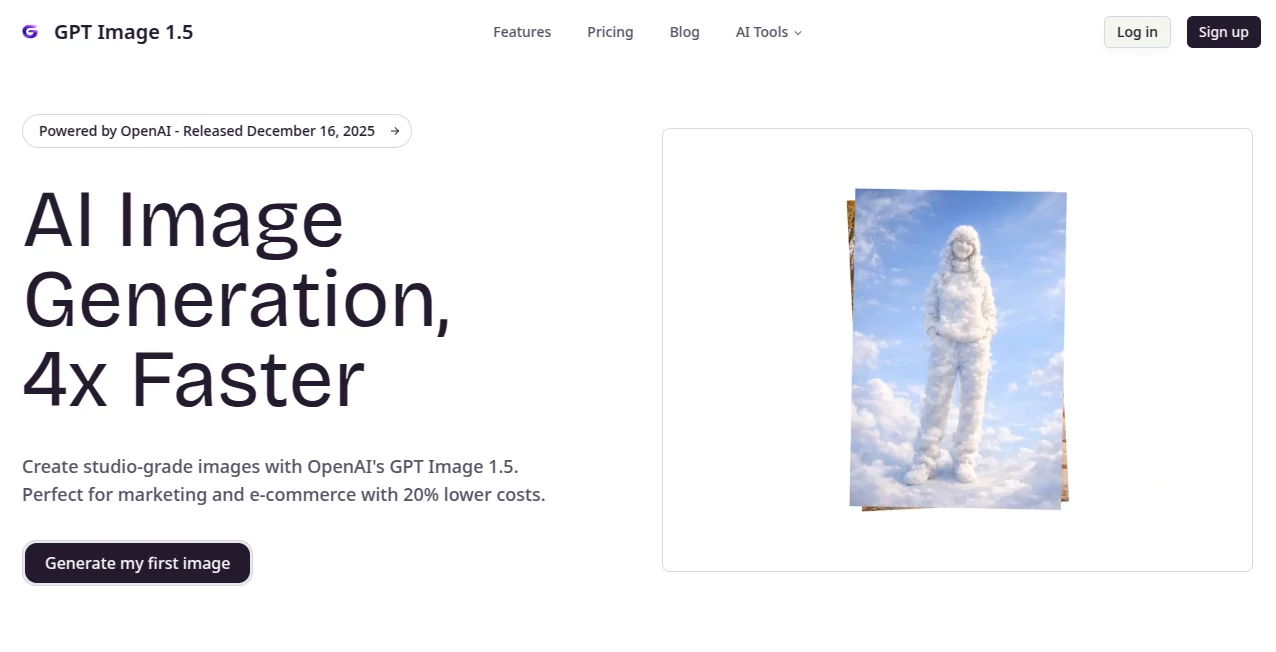
What is Gpt Image 1.5?
There's something truly exciting about feeding a detailed description into a tool and watching it spit out images that look like they came straight from a professional studio shoot. This latest leap in image creation feels like a game-changer, especially with its knack for nailing text in pictures, keeping subjects consistent across different poses, and handling multilingual layouts without a hitch. I've tinkered with it on a few projects, and the speed—four times faster than before—means you can iterate ideas over a coffee break instead of waiting around all afternoon.
Introduction
Released just yesterday, this new model builds on OpenAI's solid foundation but cranks things up with better real-world understanding and production-ready polish that's perfect for marketers or e-commerce folks watching their budgets. It shines in turning rough sketches into refined designs, generating crisp 4K outputs, or even creating multiple variations from one solid prompt. What stands out is how it cuts costs by about 20% while delivering studio-grade results, making high-end visuals accessible without the usual premium price tag. If you've been juggling multiple tools for text-heavy posters or consistent character shots, this one consolidates it all in a way that feels refreshingly straightforward.
Key Features
User Interface
The workbench layout keeps things uncluttered: a big prompt box up top, spots for uploading up to ten reference images, and straightforward dropdowns for models, resolutions, and ratios. Click an example prompt, and it auto-fills to get you started quick—ideal when you're brainstorming on the fly. Everything loads snappy, with clear credit costs shown upfront, so no surprises mid-generation.
Accuracy & Performance
It grasps prompts with impressive depth, rendering clear text on signs or products, maintaining the same face or outfit across angles, and drawing from better world knowledge for realistic details. Generations fly—often ready in moments—and the 95% first-try success rate means fewer reruns. Upscaling to 4K keeps things sharp, no blurry artifacts in sight.
Capabilities
Powered by advanced engines like Seedream variants, it excels at multilingual typography (from English to Arabic), sketch refinement, variant spins, and reference-guided consistency. Go for 2K or push to 4K, square or widescreen—it's flexible for posters, ads, or social cuts, with commercial licenses on higher plans to use freely in business.
Security & Privacy
Built on OpenAI's trusted backbone, it processes securely with options that suit personal or pro use, keeping your prompts and references handled responsibly. Higher tiers open full commercial rights, giving peace of mind for client work or sales materials.
Use Cases
E-commerce sellers craft product mockups with perfect text overlays and consistent branding across listings. Designers turn quick doodles into polished graphics for clients, saving sketch-to-final hours. Marketers whip up multilingual campaign visuals that read flawlessly in any language. Even hobbyists experiment with character series that stay true shot after shot, building stories visually without frustration.
Pros and Cons
Pros:
- Lightning-fast outputs that fit tight deadlines without quality dips.
- Superior text rendering and subject consistency for professional polish.
- Cost-effective scaling, especially yearly for heavy users.
- Reference uploads add precise control that's hard to beat.
Cons:
- Free tier limits to just a couple tries monthly, teasing the full power.
- Best results come from thoughtful prompts—vague ones might need tweaks.
Pricing Plans
Free gets you started with a pair of images monthly to feel the quality. Yearly options shine: Starter around $99 for 60 monthly generations, Pro $199 for 150 with premium perks, Studio $399 for 300 ultra outputs. Or grab a one-time pass at $14.9 for 80 anytime credits—flexible choices that reward commitment without locking you in monthly.
How to Use GPT Image 1.5
Sign up quick, head to the workbench, and paste your detailed prompt—maybe something like a rooftop scene at sunset. Upload references if you want consistency, pick your model and resolution, then generate. Results appear fast; download the favorites, or refine the prompt for another round. Batch higher plans for volume, and you're turning ideas into assets effortlessly.
Comparison with Similar Tools
It edges out others with tighter text fidelity and real-world smarts, where some stumble on letters or logic. Faster and cheaper for marketing runs, with multilingual edges that broader tools often fumble. For day-to-day pro work, it's the balanced pick—powerful without overwhelming extras.
Conclusion
This fresh release captures what's best about AI visuals right now: speed, precision, and that satisfying "just right" feel on the first go. It's empowering for anyone crafting content that needs to pop, bridging creative sparks to finished pieces without the drag. Give it a spin—you might find your workflow forever changed for the better.
Frequently Asked Questions (FAQ)
What resolutions are available?
2K standard, or bump to 4K for that extra crisp detail.
How many references can I upload?
Up to ten, keeping files under 10MB each for smooth runs.
Does it support commercial use?
Yes on paid plans, full license for business without worries.
What models power it?
Seedream 4.0 and 4.5 for top-tier fidelity and speed.
Multilingual text handling?
Flawless across English, Chinese, Japanese, and more.
AI Photo & Image Generator , AI Art Generator , AI Design Generator , AI Text to Image .
These classifications represent its core capabilities and areas of application. For related tools, explore the linked categories above.
Gpt Image 1.5 details
Pricing
- Free
Apps
- Web Tools
Categories

Gpt Image 1.5 Alternatives Product

Lexica AI

AIImageEdit

Nano Banana …

Art-Neurona

Z-Image
Nano Banana …

AI Hairstyle
NanoAI
AI Signature…