
🧠 AI Quiz
Think you really understand Artificial Intelligence?
Test yourself and see how well you know the world of AI.
Answer AI-related questions, compete with other users, and prove that
you’re among the best when it comes to AI knowledge.
Reach the top of our leaderboard.


















Inpodcast AI
What is Inpodcast AI?
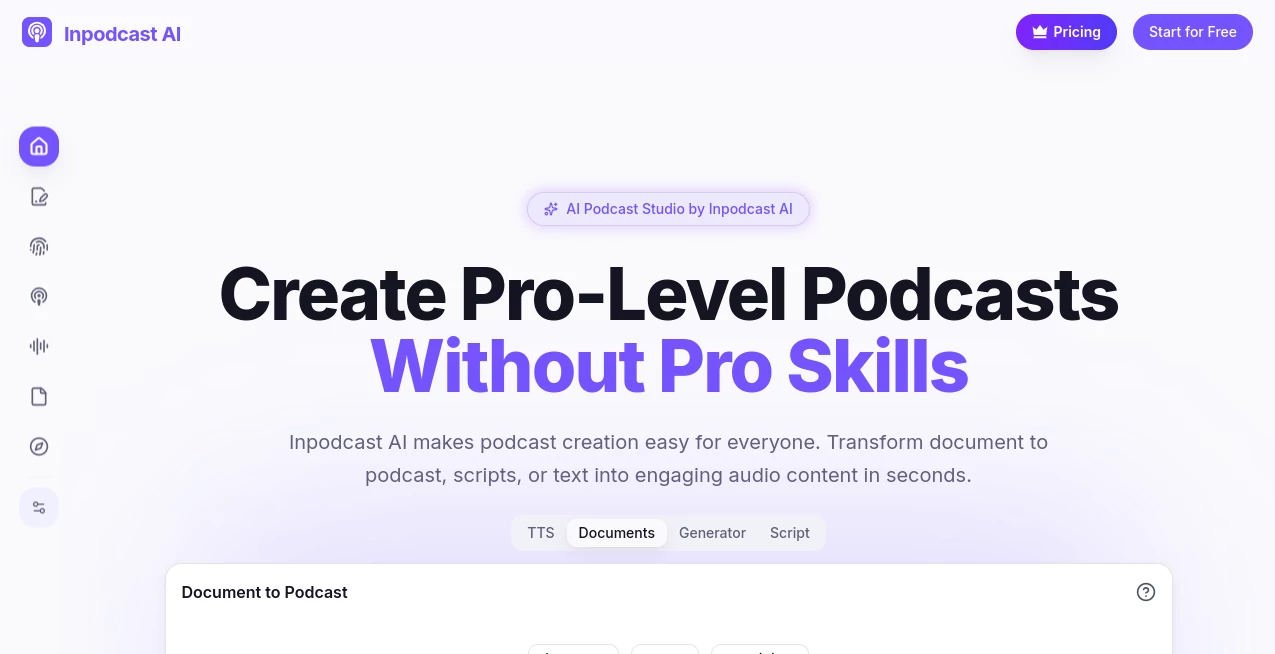
Imagine turning a stack of notes or a blog post into a captivating audio episode while you grab coffee— that's the quiet thrill this platform delivers every time. It's a lifesaver for anyone who's ever dreamed of podcasting but balked at the mic, the editing, or the sheer time suck. I tried it with an old article of mine, and out came a smooth, multi-voice conversation that sounded like a real studio session. No exaggeration: it felt like cheating, in the best way, opening doors for creators who have stories but not the setup.
Introduction
Podcasting has exploded, but let's be honest—not everyone has the gear, the voice, or the hours to record and polish episodes. This tool flips that script, letting you upload documents, scripts, or plain text and watch it weave them into engaging audio with natural voices, pauses, and even cloned tones if you want that personal touch. It's built for busy educators turning lectures into on-the-go reviews, marketers repurposing blogs for wider reach, or hobbyists finally launching that passion project. What hooks me is how it handles the heavy lifting—structuring content intelligently, picking voices that fit—so you end up with something polished and professional, minus the pro headaches. Friends in teaching swear it's revolutionized how they share materials, and I get it: the results just work.
Key Features
User Interface
Everything unfolds in a clean, three-step dance: upload your file—PDF, Word, Markdown, or text—tweak a few settings like language or voice style, and hit generate. The dashboard keeps clutter at bay, with previews that let you listen before committing, and easy edits if something feels off. It's intuitive enough that my first run felt like second nature, no tutorials needed, just drag, drop, and delight as the audio builds.
Accuracy & Performance
The smart engine digs into your content, breaking it down logically with host-guest dynamics that make monologues feel like chats, nailing emphasis and flow without awkward stumbles. Generations fly—seconds for short pieces, minutes for longer docs—and the output holds that human warmth, especially with the emotional inflections. I've fed it dense reports, and it emerged structured and listenable, saving what used to be days of manual work.
Capabilities
Upload a document and it auto-structures into episodes; paste a script for fine-tuned delivery with pauses and tone shifts; or clone your voice from a quick sample to narrate in multiple languages. With over 70 tongues supported and hundreds of voices, plus options for host-guest setups, it's versatile enough for global reaches or niche vibes. The real gem? Full ownership of your audio, ready for download or share, turning ideas into assets you control completely.
Security & Privacy
Your files and creations stay yours—processed securely, with clear policies that hand copyright straight back to you, as long as your inputs are clean. No lingering data worries; it's designed for trust, especially handy for corporate notes or personal drafts. That peace of mind lets you experiment freely, knowing your work won't wander.
Use Cases
A teacher I know converts research papers into bite-sized episodes for students commuting or multitasking, boosting retention without extra effort. Marketers repurpose newsletters into private feeds for teams, keeping everyone looped in audibly. Bloggers breathe new life into archives, reaching listeners who prefer ears over eyes. Even companies craft internal updates that feel conversational, cutting through email fatigue—one friend turned meeting minutes into digestible recaps that actually get heard.
Pros and Cons
Pros:
- Dead simple process that delivers pro-sounding results fast.
- Huge language and voice selection for truly global content.
- Voice cloning adds that authentic, personal flair effortlessly.
- Generous starting credits let you dive deep before deciding.
Cons:
- Background music integration is still on the wishlist.
- Longer docs might need splitting for best flow.
Pricing Plans
Jump in with a solid stash of free credits on signup—no card needed—enough to craft several episodes and feel the magic firsthand. It's built to let you test thoroughly, scaling naturally if you get hooked, keeping barriers low for curious creators or teams dipping toes into audio.
How to Use Inpodcast
Sign up quick, grab your credits, then head to upload—drag a PDF or paste text, pick languages and voices (maybe clone yours for fun), tweak the script if it needs a nudge, and generate. Listen to the preview, regenerate spots if desired, then download the MP3. I started with a casual blog draft, tweaked the host tone to friendly, and had a shareable episode before dinner—perfect for iterating until it sings.
Comparison with Similar Tools
Plenty of text-to-speech options exist, but few bundle document smarts, script controls, and cloning with this seamless flow and voice variety. Where others might churn flat narrations or lack multi-language polish, this one crafts dynamic, conversational episodes that hold attention longer. It's the thoughtful all-rounder for folks wanting more than basic reads—richer, readier for real audiences.
Conclusion
If you've got words worth hearing but not the setup to speak them, this platform bridges that gap beautifully, handing you pro audio without the pro grind. It's empowering in the quietest way—unlocking voices for stories that deserve ears, whether in classrooms, boardrooms, or bedrooms. Give it a spin; your next episode might just be an upload away.
Frequently Asked Questions (FAQ)
What files can I throw in?
PDFs, Word docs, Markdown, or plain text—all play nice.
How many languages?
Over 70 for output, with cloning in 13 major ones for that custom feel.
Do I own the audio?
Absolutely, full rights as long as your input's clear.
Episode lengths?
Typically 5-20 minutes, perfect bites for busy listeners.
Background tunes?
Not yet, but easy to layer externally for now.
AI Transcription , AI Audio Enhancer , AI Text to Speech , AI Podcast Assistant .
These classifications represent its core capabilities and areas of application. For related tools, explore the linked categories above.
Inpodcast AI details
Pricing
- Free
Apps
- Web Tools
Categories

Inpodcast AI Alternatives Product

Read

Transcribe A…

EasyVC

AInterview

PolyBuzz

Qwen3 TTS
AudioScribe

Goose Pod

AI Describe …