🧠 AI Quiz
Think you really understand Artificial Intelligence?
Test yourself and see how well you know the world of AI.
Answer AI-related questions, compete with other users, and prove that
you’re among the best when it comes to AI knowledge.
Reach the top of our leaderboard.


















MuseArt AI
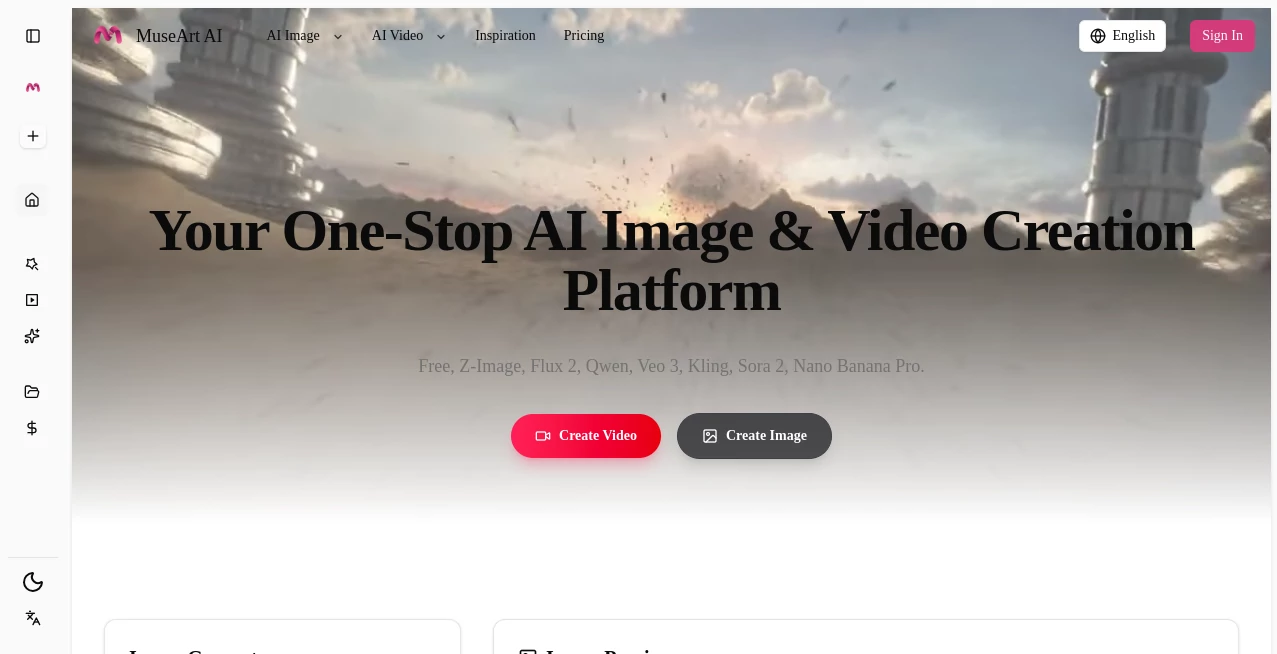
What is MuseArt AI?
There's a special kind of rush when you type a half-formed idea—“a lone samurai standing under cherry blossoms at twilight, cinematic lighting, ink wash style”—and seconds later an image appears that feels like it was painted by someone who really understood the mood. Not just a generic illustration, but something with atmosphere, deliberate composition, and that intangible spark that makes you pause and look twice. This tool captures that feeling consistently. I’ve watched friends who never considered themselves “artistic” light up when they saw their first generation—suddenly they’re creators, not just consumers. It’s the kind of experience that makes you want to keep prompting, because every output surprises you a little.
Introduction
Most image generators spit out something usable but forgettable. This one aims higher. It’s tuned to understand artistic intent: mood, lighting, composition, style references, emotional tone. Whether you start with words, a rough sketch, or a reference photo, the results carry weight and personality. Early users started sharing side-by-sides—simple prompt vs final artwork—and the jump from basic description to evocative piece keeps pulling people back. For hobbyists, concept artists, social creators, book cover designers, or anyone who wants visuals that feel intentionally made, it’s less a toy and more a quiet creative partner that actually listens.
Key Features
User Interface
The workspace is clean and focused. Wide prompt box, optional image upload for style or composition reference, simple sliders for aspect ratio, quality level, and guidance strength, then one prominent generate button. Style presets (cinematic, anime, oil painting, watercolor, cyberpunk, etc.) sit neatly below. Previews load fast enough to keep you in flow. It never feels like you’re fighting the interface—it’s built to disappear so your ideas can take center stage.
Accuracy & Performance
It reads prompts with surprising nuance—understands negative prompts well, respects style references without blindly copying, and keeps anatomy and perspective coherent even on complex scenes. Generation times stay reasonable (often 8–25 seconds depending on steps and resolution), and outputs are clean at 1024×1024 and up. The model avoids many common pitfalls: no extra limbs, no melting faces, lighting that actually makes sense. Consistency across multiple generations of the same prompt is strong—great for iterating on a concept without starting from scratch every time.
Capabilities
Text-to-image, image-to-image (style transfer, inpainting, outpainting), multiple artistic styles (realistic, anime/manga, painterly, digital art, concept art, vintage, surreal), advanced prompt understanding (composition terms, lighting descriptors, camera angles), aspect ratio control, high-resolution upscaling, batch generation, and seed locking for reproducibility. It handles detailed prompts with many elements (characters + environment + mood + style) while maintaining coherence. Outputs are sharp, print-ready, and versatile for social, commercial, or personal use.
Security & Privacy
Uploads are processed ephemerally—nothing is stored long-term unless you explicitly save the result. No mandatory account for basic generations, so your prompts and reference images don’t get tied to a profile. For creators working with client concepts, personal art, or brand-sensitive ideas, that low-retention approach feels like a small but important kindness.
Use Cases
An indie author generates evocative cover concepts in minutes instead of waiting weeks for an illustrator. A social media creator builds a consistent visual brand by feeding the same style reference across dozens of posts. A concept artist rapidly iterates environment designs for a game pitch deck. A small business owner creates polished product lifestyle images from basic shots. A hobbyist finally sees their story ideas visualized without needing to learn digital painting. Wherever imagination needs visuals fast and beautifully, it quietly delivers.
Pros and Cons
Pros:
- Artistic understanding far beyond generic generators—mood and composition feel intentional.
- Strong coherence even on detailed, multi-subject prompts.
- Hybrid text+image guidance gives precise creative steering.
- Fast enough generations that you can actually iterate in one sitting.
- Free tier is generous—real quality before you pay anything.
Cons:
- Very abstract or contradictory prompts can still produce unexpected results (same as most models).
- Higher resolutions, batch processing, and unlimited use live behind paid plans.
- Occasional need for prompt refinement on edge-case styles or complex scenes.
Pricing Plans
Free daily credits let anyone experience the quality without commitment—enough to generate several keepers per day. Paid plans unlock higher resolutions, faster queue times, unlimited generations, batch mode, and advanced features like inpainting/outpainting. Pricing feels fair for the output leap; many creators say one month covers what they used to spend on stock art or freelance illustrators for a single project.
How to Use MuseArt AI
Start with a descriptive prompt (“ethereal forest spirit, moonlight filtering through ancient trees, soft bioluminescent glow, fantasy art style”). Optionally upload a reference image for style or composition guidance. Choose aspect ratio (portrait, landscape, square) and quality level. Hit generate. Review the preview—adjust wording, guidance strength, or reference weight if needed—then download or generate variations. For iterative work, lock the seed and tweak prompts to refine the same composition. The loop is fast enough to explore several directions in one session.
Comparison with Similar Tools
Many generators produce technically correct but emotionally flat results. This one prioritizes artistic intent—lighting, mood, composition—in a way that feels closer to human-created work. Where others struggle with coherence on complex scenes, the hybrid guidance mode here gives creators more director-like control. Speed, quality, and natural-looking outputs make it stand out in a crowded field.
Conclusion
Art shouldn’t be gated behind years of practice or expensive software. Tools like this quietly open the door wider, letting more people see their ideas rendered with beauty and intention. It doesn’t replace artists—it amplifies anyone with a vision. When the distance between “I wish I could visualize this” and “here it is, exactly how I pictured it” shrinks to seconds, something fundamental shifts. For creators, dreamers, and storytellers, that shift is pure magic.
Frequently Asked Questions (FAQ)
How detailed should my prompt be?
The more specific, the better—describe mood, lighting, composition, and style references for strongest results.
Do I need a reference image?
No—text-only works beautifully—but adding one dramatically improves style and composition control.
What resolutions are available?
Up to 1024×1024 (and higher via upscaling) on paid plans; free tier offers solid preview quality.
Can I use the art commercially?
Yes—paid plans include full commercial rights; free tier allows personal & non-commercial use.
Is there a watermark on free generations?
Small watermark on free outputs; paid generations are clean.
AI Text to Image , AI Image to Image , AI Art Generator , AI Design Generator .
These classifications represent its core capabilities and areas of application. For related tools, explore the linked categories above.
MuseArt AI details
Pricing
- Free
Apps
- Web Tools
Categories

MuseArt AI Alternatives Product

Beardless Fi…

SeeDream 4.5

grok bikini

AIGAZOU

AIImageEdit

NB2 Hub

Fine Image

deck cleaner

claude image