
🧠 AI Quiz
Think you really understand Artificial Intelligence?
Test yourself and see how well you know the world of AI.
Answer AI-related questions, compete with other users, and prove that
you’re among the best when it comes to AI knowledge.
Reach the top of our leaderboard.


















Seedance AI Video Generator
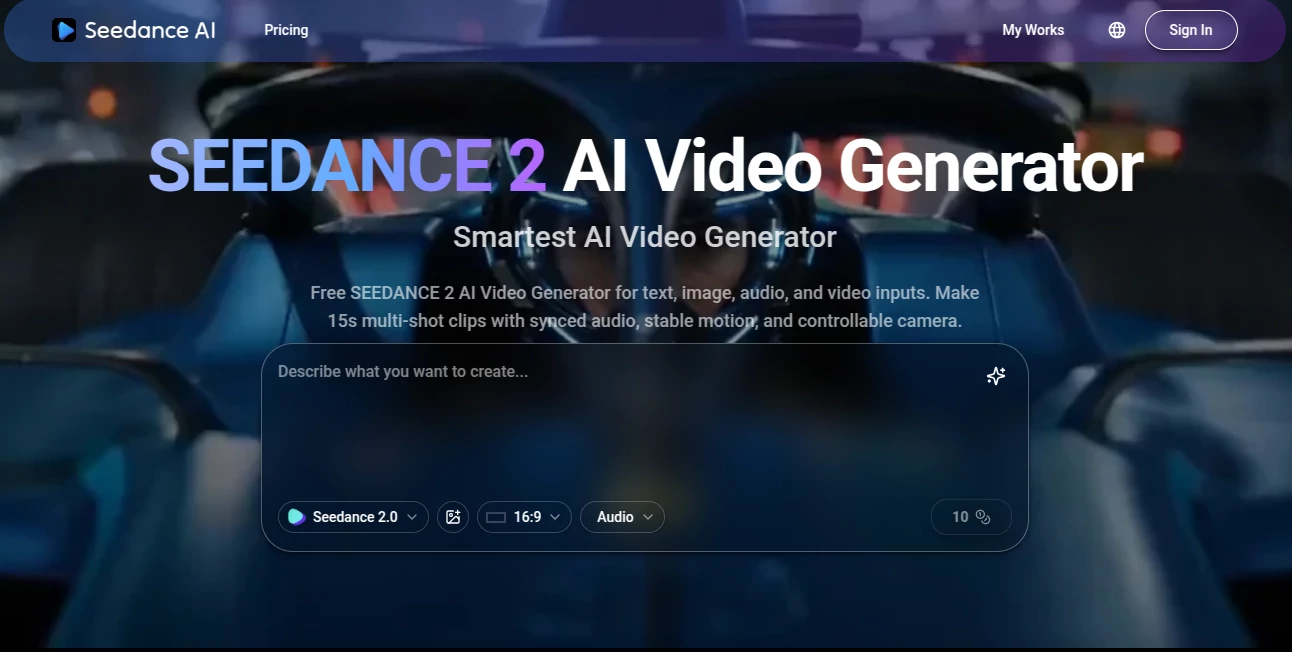
What is Seedance AI Video Generator?
There’s a moment when a generated clip stops feeling “AI-made” and starts feeling like something you could have directed yourself. That’s the quiet thrill this tool delivers. You feed it a script or a photo, maybe a short audio clip, and a few seconds later a scene plays back with real weight—subtle head turns, believable breathing, lips that actually match the words. I remember showing one to a friend who works in film; he paused it halfway and said, “Wait… that’s not stock footage?” Exactly. It’s the kind of quality that makes people lean in instead of scrolling past.
Introduction
Most AI video tools still live in uncanny valley—stiff poses, drifting faces, motion that feels like a glitchy dream. This one quietly climbs out. It focuses on the things that make video feel human: natural head movement, realistic blinks, emotional micro-expressions, and lip sync that doesn’t look like a bad dub. Whether you start with text, a still image, or an audio track, the result carries intention and flow. Early users started posting short character-driven pieces that got real shares—not because they were “AI cool,” but because they told a story well. For creators who want motion with soul, not just movement, this feels like a genuine step forward.
Key Features
User Interface
The workspace is refreshingly minimal. Large prompt field, clean upload buttons for reference images or audio, simple toggles for duration/aspect ratio/style strength, and one obvious generate button. Previews arrive fast enough to keep you in creative flow rather than waiting. No twenty hidden menus or confusing icons—just enough controls to guide without drowning you. Beginners finish their first clip quickly; people who’ve used other generators appreciate how little mental overhead it adds.
Accuracy & Performance
Head movement feels organic—people actually look where they’re supposed to, blink naturally, tilt when they speak. Lip sync aligns tightly even with fast dialogue or accents. Identity holds across shots: same face, same hair, same outfit. Generation times stay reasonable (often 30–90 seconds), and failures are usually prompt-related rather than random artifacts. That reliability means you spend time refining vision, not fixing broken physics.
Capabilities
Text-to-video, image-to-video, audio-driven animation, multi-shot narrative with consistent characters, native lip sync for dialogue, cinematic camera language (push-ins, gentle pans, motivated zooms), and strong handling of emotional close-ups, product reveals, music-synced visuals, and stylized looks. It keeps wardrobe, lighting continuity, and scene logic intact across cuts—making it feel closer to real directing than most AI video has achieved so far.
Security & Privacy
Uploads are processed ephemerally—nothing stored long-term unless you save the output. No model training on user content, no mandatory account linking for basic use. For creators handling client mockups, personal stories, or brand assets, that clean boundary provides real comfort.
Use Cases
A small brand turns a static product shot into a short lifestyle ad that feels like real footage. A musician creates a lyric video where the singer actually mouths the words in sync. A short-form creator builds consistent character Reels without reshooting daily. A filmmaker mocks up emotional beats to test tone before production. The through-line is speed + emotional credibility—getting something shareable and believable without weeks of work.
Pros and Cons
Pros:
- Outstanding character consistency and natural head/lip motion
- Lip sync that actually matches dialogue, not just approximate
- Hybrid inputs (text + image + audio) give real creative steering
- Generation speed supports meaningful iteration in one sitting
- Cinematic choices that add mood without user prompting
Cons:
- Clip length still modest (typically 5–10 seconds per generation)
- Very abstract or conflicting prompts can lead to confusion
- Full 1080p and priority queue require paid access
Pricing Plans
Free daily credits let you experience the quality without commitment—enough to feel the difference. Paid plans unlock higher resolutions, longer clips, faster queues, and unlimited generations. Pricing feels balanced for the fidelity jump; many creators say one month replaces what they used to spend on freelance editors or stock footage for a campaign.
How to Use Seedance 2 Video
Open the generator, write a concise scene description (“evening rooftop, young man in leather jacket leans on railing, city lights behind, slow camera push-in”). Upload a reference image for stronger character grounding (highly recommended). Select aspect ratio (vertical for social, horizontal for trailers) and duration. Hit generate. Review preview—adjust wording, reference strength, or motion style if needed—then download or generate variations. For longer stories, create individual shots and stitch in your editor. The loop is fast enough to refine several versions quickly.
Comparison with Similar Tools
Where many models still show face drift, unnatural blinks, or lighting mismatches, this one maintains coherence and cinematic intent across the clip. Hybrid input mode stands out—letting you guide with text, images, and audio together gives more director-like control than pure text-to-video or simple image-animation tools typically allow. It sits in a sweet spot: more controllable than raw generators, more emotionally intelligent than basic animation tools.
Conclusion
Video creation has always been expensive in time, money, or both—until tools like this quietly lower the bar. They don’t erase the need for vision; they amplify it. When the gap between “I have an idea” and “here’s a believable clip” shrinks to minutes, more people can tell visual stories. For anyone who thinks in motion, that’s a meaningful shift worth experiencing firsthand.
Frequently Asked Questions (FAQ)
How long are generated clips?
Usually 5–10 seconds per generation; longer narratives come from combining shots.
Do I need a reference image?
Not required—text-only works well—but adding one greatly improves consistency.
What resolutions are supported?
Up to 1080p on paid plans; free tier offers preview-quality.
Can I use outputs commercially?
Yes—paid plans include full commercial rights.
Watermark on free generations?
Small watermark on free clips; paid removes it completely.
AI Animated Video , AI Image to Video , AI Text to Video , AI Video Generator .
These classifications represent its core capabilities and areas of application. For related tools, explore the linked categories above.
Seedance AI Video Generator details
Pricing
- Free
Apps
- Web Tools
Categories

Seedance AI Video Generator Alternatives Product

HypeClip

Flow Veo 3

Kling 3.0 Vi…
GoViralTrend

Sora2 AI Vid…

Seedream 4.0…

Veo 3.1

Seedance 2.0

kling 4.0