


















Grades Calculator
What is Grades Calculator?
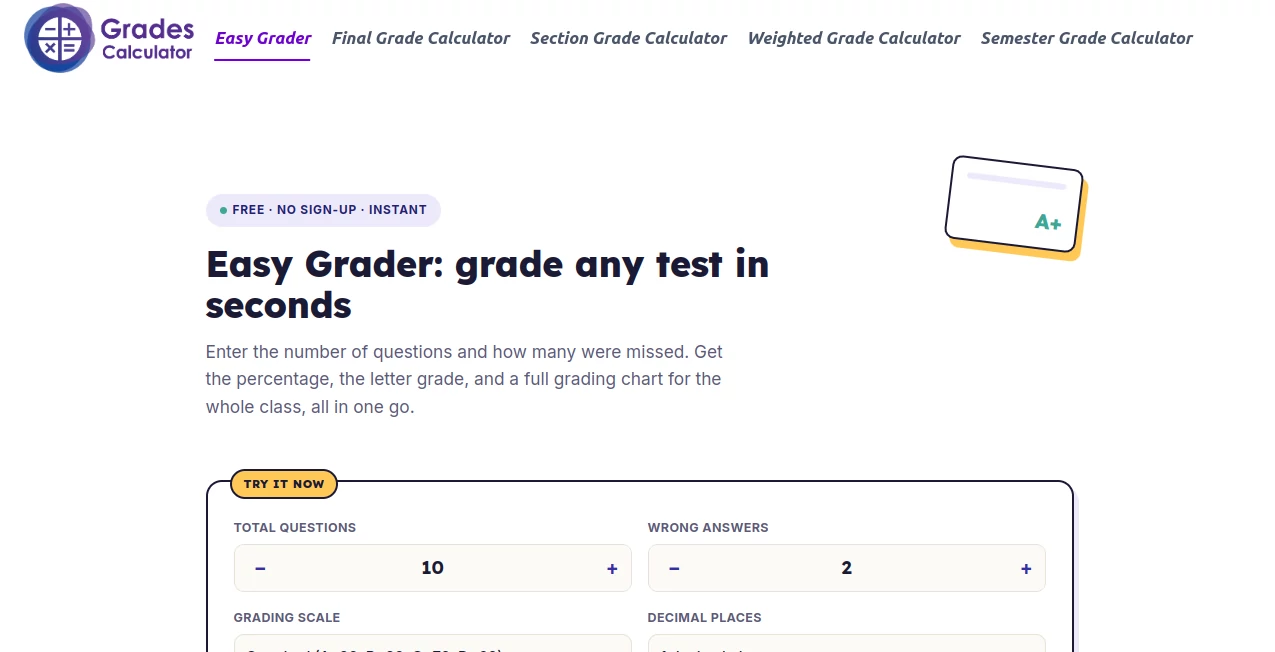
GradesCalculator.net is a practical online grading tool built for one of those small tasks that can become surprisingly time-consuming: turning the number of questions and mistakes on a test into a percentage and letter grade. Instead of reaching for a calculator after every paper, teachers can enter the total number of questions and the number answered incorrectly, then see the result immediately.
The simplicity is the main attraction. There is no account to create, no complicated setup, and no spreadsheet to prepare. The calculator is designed for teachers handling a stack of quizzes, but it is equally useful for students and parents who want to understand what a particular test score means.
Key Features
- Instant percentage and letter-grade calculations from total and incorrect answers.
- A grading chart showing every possible result for a particular test.
- Multiple grading scales, including Standard, Strict, and Lenient options.
- Adjustable decimal-place settings for more precise results.
- Free access without registration or sign-up.
- Browser-based calculations that work across computers, tablets, and phones.
- Useful for quizzes, exams, spelling tests, multiple-choice tests, and other question-based assessments.
User Interface
The interface keeps the process focused on the information that actually matters. Users enter the total number of questions and the number of wrong answers, choose a grading scale, and immediately receive the result. The controls are straightforward, which is particularly helpful when grading several papers in a row.
The grading chart is an especially useful touch. Once the number of questions is set, the complete range of possible scores can be displayed. A teacher grading a class of 25 students can therefore look at the number of mistakes on each paper and find the corresponding percentage and letter grade without repeating the calculation.
Accuracy & Performance
The underlying calculation is simple: correct answers are determined by subtracting wrong answers from the total, then the correct count is divided by the total number of questions and converted into a percentage. Because the calculation is automated, there is less opportunity for the small arithmetic mistakes that can happen during a long grading session.
The site is also designed for immediate results. Changing an input updates the displayed score without requiring a page reload. For a teacher moving quickly through a pile of tests, that responsiveness makes the tool feel considerably more convenient than doing each calculation manually.
Capabilities
The calculator is particularly effective when several students have taken the same test. For example, on a 25-question exam, a student with three incorrect answers has 22 correct answers, producing an 88% score. Once the 25-question grading chart is displayed, every other possible result can be checked from the same table.
Users can also select from three grading approaches. Standard is intended for common grading cutoffs, while Strict and Lenient options provide alternatives for schools or teachers that use different thresholds. If an institution follows its own grading policy, the percentage can still be used as the reference point before applying the institution's official letter-grade rules.
Security & Privacy
Privacy is straightforward because the calculator does not require an account and states that information entered into the tool is not saved or sent anywhere. Calculations take place directly in the browser, making the service suitable for quick academic calculations without creating another account or storing a collection of student scores online.
That said, teachers should always follow their school's privacy policies when working with student information. The safest approach is to use the calculator for numerical grading rather than entering personally identifiable student details.
Use Cases
Teachers: The strongest use case is grading a batch of identical tests. Enter the total number of questions once, open the grading chart, and then check each student's number of mistakes against the corresponding result.
Students: A student who knows the number of questions answered correctly can quickly determine the percentage and likely letter grade. This is useful when reviewing an exam result or estimating academic performance.
Parents and tutors: When a result is written as a raw score rather than a percentage, the calculator provides an easy way to understand the outcome without working through the formula manually.
Different grading policies: The available grading scales make the calculator more flexible than a basic percentage calculator, particularly when the standard grading thresholds do not match the user's preferred system.
Pros and Cons
Pros
- Free to use with no sign-up requirement.
- Very simple input process.
- Instant results.
- Full grading chart for an entire test.
- Several grading-scale options.
- Works on desktop and mobile devices.
- No need to install an application.
Cons
- It is primarily designed for individual tests and quizzes based on question counts.
- It is not a replacement for a weighted course-grade calculator when assignments have different weights.
- Schools with unusual grading policies may need to apply their own letter-grade thresholds manually.
Pricing Plans
The calculator is free to use and does not require users to create an account. There is no subscription or payment step involved in the core grading process, making it particularly convenient for occasional users as well as teachers who need a quick grading reference throughout the school year.
How to Use It
- Enter the total number of questions on the test or quiz.
- Enter the number of incorrect answers. Blank or unanswered questions can be counted as wrong when appropriate.
- Select the grading scale that best matches the grading policy being used.
- Choose the desired number of decimal places if greater precision is needed.
- Check the displayed percentage and letter grade.
- Open the grading chart when working through multiple papers from the same test.
For example, if an exam contains 20 questions and a student misses two, the result is 18 correct out of 20, or 90%. The calculator can then translate that percentage into the corresponding letter grade according to the selected scale.
Comparison with Similar Tools
A basic percentage calculator is useful when you only need to divide one number by another. The advantage here is that the process is tailored specifically to classroom grading. Instead of calculating every student's percentage separately, the grading chart can show all possible outcomes for the same test at once.
It is also different from weighted grade calculators. A weighted calculator is better when homework, projects, exams, and other categories contribute different percentages to a final course grade. This tool is more focused: it handles the relationship between total questions, mistakes, percentage, and letter grade with very little setup.
That focused approach is what makes it useful. If the task is simply to turn test results into grades, adding unnecessary features would make the experience harder rather than better.
Conclusion
For teachers, students, tutors, and parents who regularly need to convert test results into meaningful grades, this calculator offers a refreshingly direct solution. Its strongest feature is not a long list of advanced functions but the way several useful details come together: instant calculations, a full grading chart, flexible grading scales, mobile accessibility, and no registration.
The result is a tool that fits naturally into everyday academic work. When the job is grading a stack of identical quizzes or quickly checking what a test score represents, there is little reason to make the process more complicated than it needs to be.
Frequently Asked Questions (FAQ)
Is the calculator free to use?
Yes. The calculator is available for free and does not require users to sign up for an account.
Can it grade an entire class?
Yes. After entering the total number of questions, the grading chart can display every possible score for that test. This allows teachers to look up each student's result without performing a new calculation every time.
Which grading scales are available?
The calculator provides Standard, Strict, and Lenient grading scales. If none matches a school's official policy, the percentage result can be used with the school's own letter-grade cutoffs.
Can students use it?
Yes. Students can use it to convert a test score into a percentage and letter grade or to understand the result of an assessment when only the number of mistakes is known.
Does it work on mobile devices?
Yes. The calculator is designed to work on phones, tablets, and computers, so it can be used without installing a separate application.
Is it suitable for weighted course grades?
Not primarily. When assignments have different weights, a weighted grade calculator is a better choice because it accounts for how much each assignment contributes to the overall course grade.
How is a test percentage calculated?
The number of wrong answers is subtracted from the total number of questions to determine the number correct. The number correct is then divided by the total number of questions and multiplied by 100 to produce the percentage.
What if my school uses a different grading policy?
You can use the percentage produced by the calculator and then apply the official letter-grade thresholds used by your school, district, college, or teacher.
AI Education Assistant , Education .
These classifications represent its core capabilities and areas of application. For related tools, explore the linked categories above.
Grades Calculator details
Pricing
- Free
Apps
- Web App
Categories

Grades Calculator Alternatives Product

Keepmind

Anti Noise F…

Instantly Id…

Youshow IELTS

Ask Bishop

Casper Pract…

Llamaroo

Peanut AI

morse code t…