


















ImageChanger
What is ImageChanger?
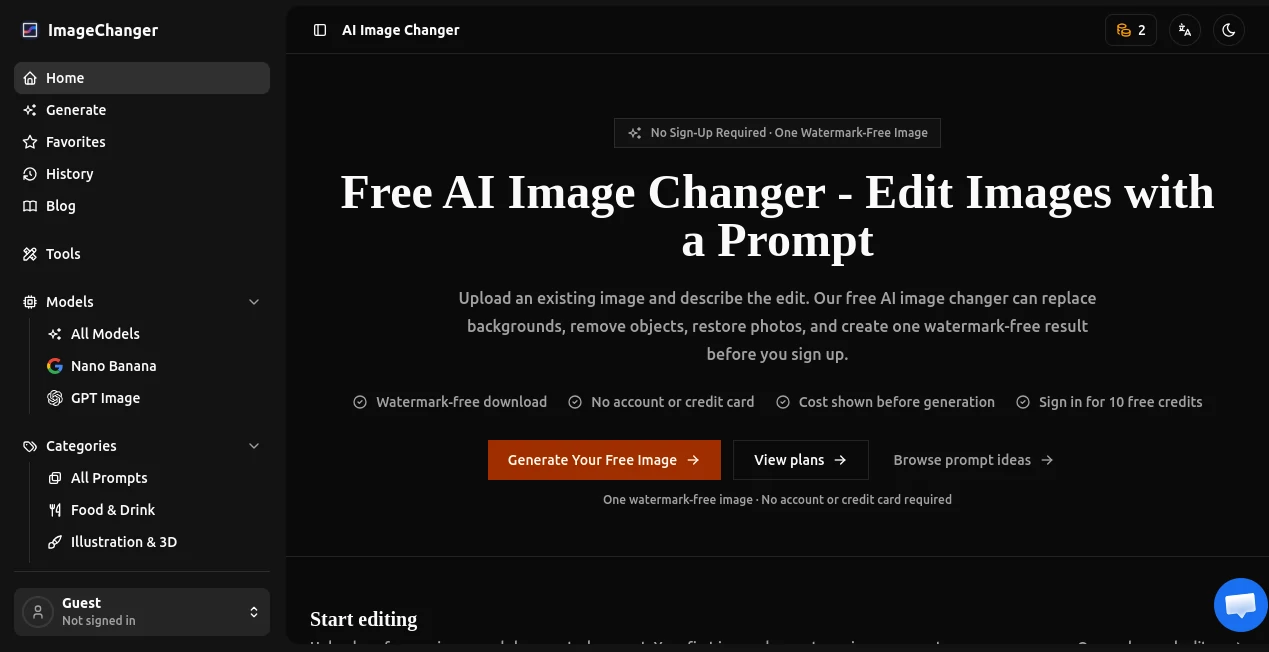
ImageChanger is a prompt-based AI image editing tool built for people who want to change an existing picture without spending time working through complicated layers, selections, and masking tools. Instead of rebuilding an image from scratch, you upload a reference, describe what you want to change, and let the AI handle the edit.
The service focuses on practical image transformations such as replacing backgrounds, removing unwanted objects, changing hair color, restoring old photographs, and applying new visual styles. It also supports creative workflows for product photography, advertising, fashion, social media content, and brand campaigns.
One particularly convenient detail is the guest experience. A first image can be generated without creating an account or entering credit card information, and the initial result is watermark-free. Users who continue with a free account receive 10 welcome credits.
Key Features
- Prompt-based editing of existing images
- AI background replacement while preserving the main subject
- Object and unwanted-element removal
- AI hair color changes with attention to the original appearance
- Style transfer for creative visual transformations
- Restoration of damaged or aging photographs
- Support for multiple aspect ratios, including 1:1, 2:3, 3:2, 3:4, 4:3, 9:16, and 16:9
- Resolution options up to 4K
- GPT Image 2 support
- Reusable prompts, history, and favorites on higher plans
- Watermark-free results on supported plans
User Interface
The interface is designed around a straightforward editing workflow. The main workspace gives users an area to upload reference images, a prompt field for describing the desired change, preset actions, aspect-ratio controls, resolution settings, and quality options.
Preset actions are useful when the required edit is obvious. For example, someone who wants to remove an unwanted object does not need to construct a complicated instruction from scratch. They can select the relevant task and refine the request when necessary.
The editor also accepts up to five reference images, which can be useful when an edit requires more visual context. The overall approach feels closer to giving instructions to a creative assistant than operating traditional photo-editing software.
Accuracy & Performance
The quality of an AI image edit naturally depends on the source image, the prompt, and the selected generation settings. However, the platform places particular emphasis on preserving important elements of the original image while modifying the requested area.
For background replacement, for instance, the editing prompt can specify that the main subject, pose, composition, crop, lighting, shadows, and important foreground details should remain consistent. This makes the feature useful when the goal is to change the environment without making the original subject look like a completely different image.
Users can choose between 1K, 2K, and 4K resolutions, while quality settings range from Standard to High. Higher settings consume more credits, so the controls provide a practical way to balance output quality against editing costs.
Capabilities
The platform goes beyond simple filters. Its editing workflow can make substantial changes to an existing photograph while maintaining recognizable elements of the original.
Background replacement is particularly useful for product images, portraits, property photography, and social content. Object removal can clean up distracting elements from a scene, while hair-color editing allows users to preview a different appearance without changing the underlying portrait.
The restoration feature is aimed at older photographs, including images affected by scratches, fading, and other visible damage. Style transfer provides another creative direction, allowing a conventional photograph to be transformed into styles such as watercolor, paper collage, or editorial illustration.
For marketers and designers, the prompt library adds another layer of usefulness. It includes ideas for product campaigns, lifestyle editorials, fashion visuals, social collages, food photography, brand identity concepts, and other commercial creative work.
Security & Privacy
Privacy is an important consideration whenever users upload personal photographs or commercial assets to an online AI editor. The service provides dedicated privacy and legal information through its website, while the editing experience does not require an account for the initial guest generation.
For commercial projects, users should still review the current privacy policy and terms before uploading confidential, sensitive, or proprietary material. Paid plans also advertise a commercial-use license, which can be relevant for businesses producing advertising, product, or branded content.
Use Cases
- Product photography: Replace a plain background with a polished environment without organizing a new photo shoot.
- Social media: Adapt existing photographs into different visual concepts for posts, campaigns, and promotional content.
- E-commerce: Create cleaner product imagery and remove distracting objects from product scenes.
- Portrait editing: Experiment with hair colors, backgrounds, and artistic treatments while retaining the original subject.
- Old photo restoration: Repair scratches, fading, and visible damage in aging family photographs.
- Advertising: Turn a basic product image into a campaign-oriented visual with a more carefully directed environment.
- Creative design: Explore collage, watercolor, editorial, and other visual directions without starting the artwork from a blank canvas.
- Agency workflows: Higher-tier plans can be useful for teams that repeatedly create and revise commercial imagery.
Pros and Cons
Pros
- First guest image can be created without signing up.
- The initial guest result is watermark-free.
- Prompt-based editing is approachable for non-designers.
- Useful presets simplify common editing tasks.
- Supports resolutions up to 4K.
- Offers several aspect ratios for different publishing formats.
- Supports commercial use on paid plans.
- Higher plans include history, favorites, and reusable prompts.
Cons
- AI generation consumes credits, especially at higher resolutions and quality levels.
- Complex edits may require several prompt iterations to achieve the desired result.
- Users who need detailed pixel-level manual control may still prefer traditional professional image editors.
- The most extensive production features are reserved for paid plans.
Pricing Plans
A free option allows users to test the editing workflow before committing to a subscription. The free account includes 10 welcome credits, with the service estimating around five GPT Image 2 edits at 1K resolution depending on usage.
- Free: 10 welcome credits, approximately five 1K GPT Image 2 edits, one image per generation, and basic queue speed.
- Pro: $9.90 per month when billed annually, with 3,600 credits per year, high-resolution output, watermark-free results, faster priority generation, and a commercial-use license.
- Max: $19.90 per month when billed annually, with 12,000 credits per year, high-resolution output, priority rendering, faster retries, commercial use, history, favorites, and reusable prompts.
- Studio: $99 per month when billed annually, with 72,000 credits per year, high-resolution output, the highest-priority rendering lane, commercial use, and team-friendly prompt and history reuse.
The exact value of each plan depends on how frequently images are generated and which resolution and quality settings are selected. For occasional edits, the free tier provides a low-risk way to evaluate the workflow. Regular creators and agencies have more reason to consider the paid tiers.
How to Use It
- Upload an existing image that you want to edit.
- Choose a preset such as background replacement, object removal, hair-color change, style transfer, or photo restoration, or write your own instruction.
- Describe the desired change as clearly as possible. Mention important details that should remain unchanged.
- Select the preferred aspect ratio, resolution, and quality level.
- Review the displayed credit cost before generating.
- Generate the edited image and review the result.
- Download the finished image if it meets your requirements, or refine the prompt and try another version.
A useful approach is to be specific about what should change and equally specific about what should stay intact. For example, instead of simply asking for a new background, describe the setting, lighting, camera perspective, depth of field, and the elements of the original subject that must be preserved.
Comparison with Similar Tools
Traditional image editors remain stronger when a designer needs precise manual control over individual pixels, layers, masks, typography, and complex compositions. AI-first editors take a different approach by reducing the amount of manual work required to make a substantial visual change.
Compared with basic one-click photo enhancement services, this platform is more focused on instruction-driven transformation. The user can describe a desired scene or modification rather than relying solely on predefined filters.
It is also more flexible than a narrowly focused background-removal service because the workflow covers several types of transformation, including object removal, style changes, hair-color edits, restoration, and broader creative image generation. The presence of resolution controls, prompt presets, reusable prompts, and commercial licensing makes it particularly relevant to creators who want to move from experimentation into repeatable production.
Conclusion
AI image editing becomes much more useful when it can understand the difference between what needs to change and what needs to stay. That is the central idea behind this platform. Rather than forcing users to rebuild an image manually, it provides a prompt-driven way to modify existing visual material.
The combination of background replacement, object removal, portrait adjustments, restoration, style transfer, high-resolution output, and commercial-use options gives it a broad range of practical applications. A casual user can test the experience without an account, while creators, marketers, and agencies can move toward higher-volume workflows as their needs grow.
For anyone who regularly starts with an existing image and thinks, “I like this picture, but I wish this one thing were different,” this type of AI editor can save a surprising amount of time.
Frequently Asked Questions (FAQ)
Can I try the image editor without creating an account?
Yes. The first guest image can be generated without an account or credit card, and the initial result is offered without a watermark.
What can I change in an existing image?
You can replace backgrounds, remove unwanted objects, change hair color, apply different visual styles, restore aging photographs, and perform broader prompt-based edits.
Does it support high-resolution images?
Yes. The editor provides 1K, 2K, and 4K resolution options, with higher-resolution generations consuming more credits.
Which AI model does it use?
The current editing interface supports GPT Image 2, described on the service as its most capable OpenAI image model, with support for different quality tiers and output resolutions.
Can the generated images be used commercially?
Paid plans advertise a commercial-use license. Users should review the current terms and licensing conditions for their specific project before using generated images commercially.
How many reference images can I upload?
The editing interface supports up to five reference images, allowing additional visual context when an edit requires it.
Is there a free plan?
Yes. The free option provides 10 welcome credits after account creation. A guest can also test one watermark-free image before signing up.
Can I remove unwanted people or objects from a photograph?
Yes. The object-removal workflow lets users describe the unwanted object, person, or clutter and asks the AI to reconstruct the surrounding scene naturally.
Can I restore old photographs?
Yes. The restoration feature is designed to repair issues such as scratches, fading, and visible damage while attempting to retain the character of the original photograph.
Is this a replacement for professional photo-editing software?
It can replace many manual editing tasks for everyday creative work, but professional software may still be preferable when exact layer-based control, detailed masking, typography, or pixel-level adjustments are required.
Photo & Image Editor , AI Background Generator , AI Photo Restoration , AI Image to Image .
These classifications represent its core capabilities and areas of application. For related tools, explore the linked categories above.
ImageChanger details
Pricing
- Freemium
Apps
- Web App
Categories

ImageChanger Alternatives Product

img2img.net

insMind

ArchOne AI

Text Behind …

AI Image Edi…

PhotoEditorAI

BananaFrame

MuseArt AI

Image To Ima…