


















iyadel
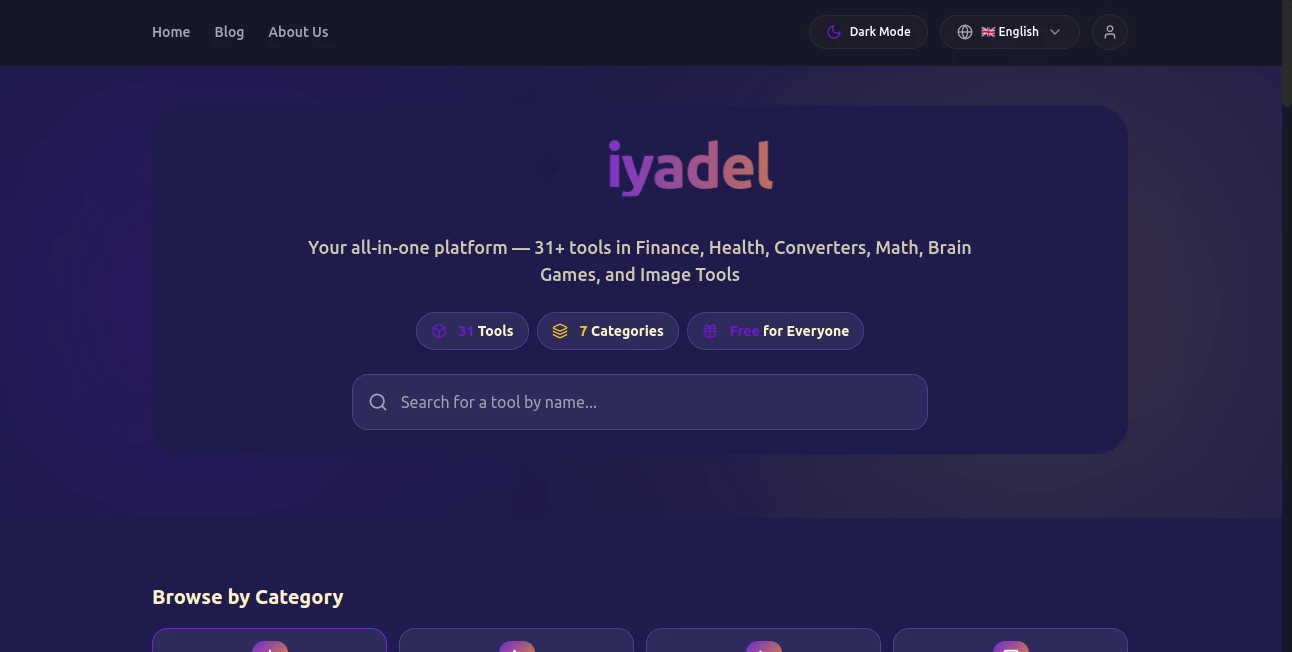
What is iyadel?
Finding a simple tool for a quick calculation, conversion, image task, or everyday decision should not require signing up for several different services. iyadel brings more than 31 interactive tools together in one free platform, covering areas such as finance, health, converters, mathematics, brain games, and image tools.
The idea is refreshingly straightforward: choose a tool, enter the required information, and get an immediate result. There is no registration process and no payment requirement, making the platform particularly useful for people who need practical utilities without the usual friction.
From calculating loan payments and compound interest to checking BMI, converting values, playing small brain games, or working with images, the collection is designed around common tasks that people encounter in everyday life.
Key Features
- More than 31 interactive tools organized into practical categories.
- Finance utilities including loan, interest, and bond-related calculators.
- Health-oriented tools such as BMI-related utilities.
- Converters for common everyday calculations and transformations.
- Mathematical tools for quick calculations and problem solving.
- Brain games designed for short and casual mental challenges.
- Image processing utilities for common image-related tasks.
- Free access without mandatory registration or payment.
- Browser-based processing for most calculators, converters, and image tools.
- Responsive access across desktop, tablet, and mobile devices.
User Interface
The interface focuses on getting users to the right tool quickly. A search field allows visitors to look for a specific utility by name, while category buttons make it easy to browse areas such as Finance, Health, Converters, Math, Games, and Image Tools.
The individual tools are presented as interactive utilities rather than complicated software dashboards. This makes the experience comfortable for someone who simply wants to solve one task and move on. For example, a person checking a loan payment does not need to learn a complete financial application first.
Accuracy & Performance
For calculator and conversion utilities, the main advantage is convenience: users can perform calculations directly in the browser and see results without installing dedicated software. The platform describes its collection as interactive and accurate, while keeping the tools lightweight enough for everyday use.
Performance also benefits from its browser-first approach. Most calculators, converters, and image tools process information locally, which means users can work with them without routinely sending their input to a remote server.
Capabilities
The range of utilities is broader than a typical single-purpose calculator website. Finance tools include a Loan Calculator, Simple & Compound Interest calculator, and Bond Yield calculator. The platform also covers health, conversions, mathematics, games, and image processing.
There is also an AI Logo Maker within the wider collection. Unlike most of the calculator and converter utilities, this particular feature uses server-side processing when actively used. This gives the platform a useful bridge between traditional online utilities and newer AI-powered creative tools.
Security & Privacy
Privacy is one of the stronger points of the service. The platform states that it does not use Google Analytics or third-party trackers, does not profile users, and does not record which tools they use through tracking cookies.
Most calculators, converters, and image tools operate locally inside the browser. According to the published privacy information, the AI Logo Maker and administrative blog uploads are the exceptions that use the platform's servers when those features are actively used.
This local-first approach is especially useful when entering information into a calculator or working with an image where sending unnecessary data to a server would be undesirable.
Use Cases
The platform fits a surprisingly wide range of quick tasks. A student can use mathematical utilities or brain games while studying, while someone managing personal finances can check loan costs, interest growth, or bond-related figures.
It can also be useful for everyday health calculations. Someone curious about their BMI, for example, can obtain a quick starting point without downloading a dedicated health application.
For casual users, converters and image utilities are perhaps the most convenient part of the collection. Instead of searching the web every time a small conversion or image task comes up, several useful tools are available from the same place.
A freelance designer or small business owner may also find the logo creation feature useful when they need a quick starting point for visual branding rather than a full professional design workflow.
Pros and Cons
- Pros: Free to use, no registration required, broad selection of practical utilities, browser-based processing for most tools, responsive across devices, and a clear category-based interface.
- Pros: Strong privacy positioning, with no Google Analytics or third-party tracking according to the published privacy policy.
- Pros: Useful combination of traditional calculators, converters, image utilities, games, and an AI-powered logo feature.
- Cons: The platform is designed primarily for quick utility tasks rather than deep professional workflows.
- Cons: Users looking for advanced financial, medical, design, or analytical software may eventually need a more specialized application.
Pricing Plans
The entire platform is free for everyone. There is no required registration and no payment is needed to access the collection of tools.
This pricing model makes the service particularly attractive for occasional users. Someone who only needs a loan calculation once, converts an image occasionally, or wants to check a mathematical result does not have to create an account or commit to a subscription.
How to Use the Platform
- Open the platform and browse the available categories.
- Use the search field if you already know which utility you need.
- Select the appropriate calculator, converter, health utility, game, or image tool.
- Enter the requested information into the interactive fields.
- Review the result and adjust the inputs if you want to test another scenario.
- For creative tasks, choose the relevant image or logo feature and follow its on-screen instructions.
Comparison with Similar Tools
Many online utility websites specialize in just one area. A financial calculator website may offer dozens of finance-related formulas but nothing for image processing or everyday conversions. Likewise, an image utility service may be excellent for pictures while offering no help with loans, mathematics, or health calculations.
The main difference here is breadth. Instead of trying to replace specialized software, the platform acts more like a digital toolbox. You may not use every tool, but having many small utilities available in one place can save considerable time when handling unrelated tasks throughout the day.
Its free, no-registration approach also makes it different from platforms that place basic utilities behind accounts or subscription plans.
Conclusion
A good utility website does not need to be complicated. The strength of this platform comes from bringing a broad collection of useful tools into one accessible location and keeping the experience focused on the task at hand.
With more than 31 tools spanning finance, health, conversions, mathematics, games, and image processing, it offers a practical solution for everyday digital needs. The browser-first processing model and privacy-focused approach add another reason to consider it when a quick calculation or utility is all that is required.
For users who regularly find themselves searching for small online tools, having this many free utilities gathered under one roof can make everyday tasks noticeably easier.
Frequently Asked Questions (FAQ)
Is the platform free to use?
Yes. The platform states that its tools are completely free, with no registration or payment required.
How many tools are available?
The platform currently advertises more than 31 interactive tools covering seven broad areas.
Does it require an account?
No. Users can access the free tools without creating an account.
Are calculations processed on a server?
Most calculators and converters run directly in the browser. This local-first approach means their processing does not normally require sending the input to a remote server.
Does the platform track users?
According to its privacy policy, it does not use Google Analytics or third-party trackers, does not profile users, and does not track which tools they use through tracking cookies.
Can it be used on mobile devices?
Yes. The platform states that its tools work across mobile phones, tablets, and desktop computers.
Does it include AI features?
Yes. Among its collection is an AI Logo Maker. This feature is treated differently from most browser-based utilities because its processing uses the platform's servers when actively used.
AI Photo & Image Generator , AI Logo Generator , AI Productivity Tools , Other .
These classifications represent its core capabilities and areas of application. For related tools, explore the linked categories above.
iyadel details
Pricing
- Free
Apps
- Web App
- iOS App
- Android App
Categories

iyadel Alternatives Product

Sourcetable

Magpie

Photoshoot A…

Mage

CapyQR

Discord Time…

Forge GUI

LorePanic

Black Screen
