
Krea 2 AI
What is Krea 2 AI?
Krea 2 is an advanced AI-powered image generation platform built for creators who want more than ordinary visuals. Instead of producing repetitive results, it focuses on artistic expression, style diversity, and creative freedom. Whether you are designing marketing assets, concept art, social media graphics, or digital illustrations, this platform offers a fast and enjoyable workflow that encourages experimentation.
Unlike many image generators that prioritize safe and predictable outputs, this solution gives users greater influence over composition, lighting, textures, colors, and artistic direction. Text prompts can be transformed into impressive visuals in seconds, while image-to-image generation makes it easy to refine existing artwork or create entirely new variations. The interface is clean, responsive, and welcoming even for people who have never used AI design tools before.
Creative professionals appreciate how quickly ideas move from imagination to finished artwork. Instead of spending hours adjusting complex settings, users can focus on visual storytelling while the platform handles the heavy technical work behind the scenes.
Key Features
User Interface
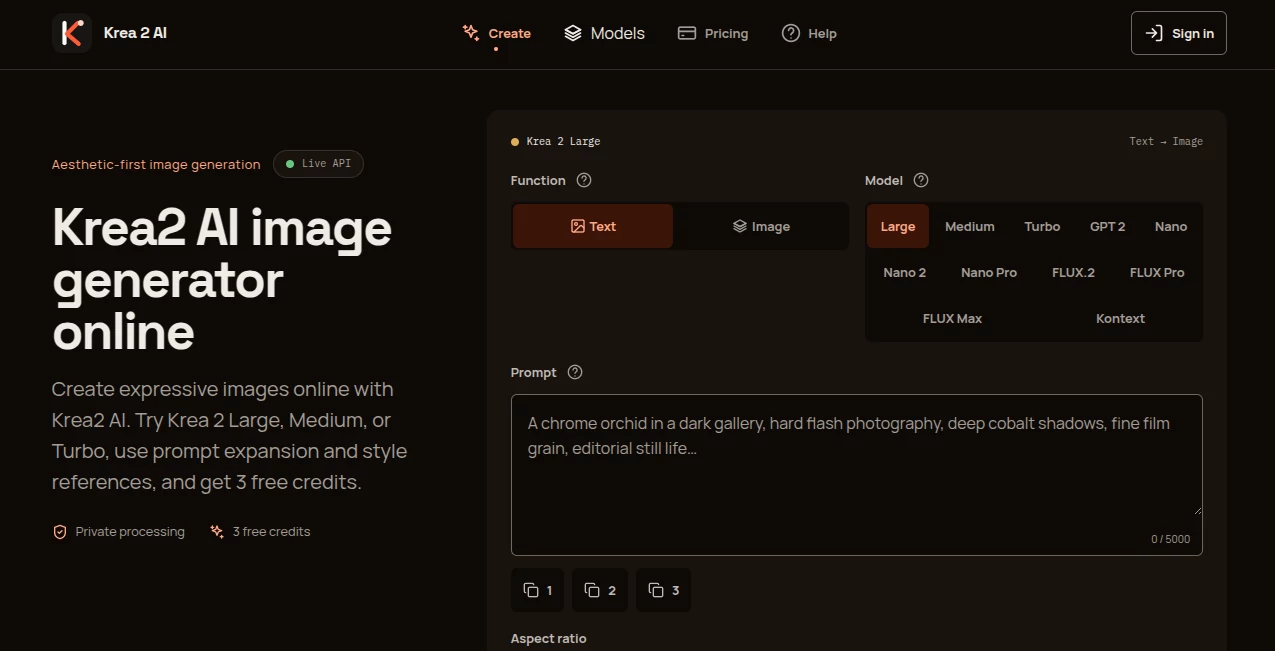
The workspace is thoughtfully organized, allowing users to begin generating images immediately. Prompt input, aspect ratio selection, creativity controls, and model selection are all easy to access. The minimal interface removes unnecessary distractions and keeps attention on the creative process.
Accuracy & Performance
The platform delivers high-quality image generation with remarkable speed. Multiple generation models allow users to balance quality and performance depending on their project. Images are produced quickly while maintaining impressive visual detail, expressive lighting, realistic textures, and artistic consistency.
Capabilities
Users can generate images from text prompts, transform existing images, experiment with multiple artistic styles, create moodboards, explore cinematic compositions, and produce professional-quality illustrations. Support for various aspect ratios makes it suitable for websites, social media, presentations, digital advertising, print materials, and creative portfolios.
The platform also supports reference-based image creation, making it easier to preserve visual consistency across multiple projects while exploring different artistic directions.
Security & Privacy
User accounts include private workspaces where generated content and project history remain accessible. Authentication protects personal projects, while users maintain control over how they use their generated images. Commercial usage options are available depending on the selected subscription plan.
Use Cases
Graphic designers can rapidly create concept artwork before final production. Marketing teams can generate advertising visuals without expensive photoshoots. Content creators can produce unique thumbnails, social media graphics, blog illustrations, and promotional images in minutes.
Game developers, architects, product designers, fashion brands, educators, and creative agencies can also benefit from rapid visual ideation. The ability to test multiple artistic directions dramatically reduces design time while inspiring fresh creative ideas.
Pros and Cons
Pros
Fast image generation with multiple performance modes.
Excellent artistic style diversity.
Supports both text-to-image and image-to-image workflows.
Simple interface suitable for beginners and professionals.
Multiple aspect ratios for different publishing platforms.
Creative controls encourage experimentation rather than repetitive outputs.
Cons
Some premium features require a paid subscription.
Free credits may not be sufficient for heavy daily usage.
Highly detailed prompts often produce the best results, so beginners may need a little practice.
Pricing Plans
A free plan allows new users to explore the platform with limited credits before upgrading. Paid subscriptions provide additional monthly credits, higher generation limits, commercial features, and priority access. Flexible plans make it suitable for individual creators as well as professional studios. Pricing may change over time, so users should always verify the latest plans on the official website.
How to Use Krea 2
Create an account and access the image generation workspace.
Choose a generation model that matches your desired balance between speed and quality.
Write a descriptive prompt explaining the subject, composition, lighting, style, and mood.
Select the preferred aspect ratio and creativity level.
Generate the image and review the results.
Refine the prompt, upload a reference image if needed, and continue iterating until the desired outcome is achieved.
Download the final image for personal or commercial projects according to your subscription.
Comparison with Similar Tools
Compared with many AI image generators, this platform places greater emphasis on artistic freedom and visual personality rather than producing uniform results. While several competing solutions focus primarily on photorealism, this generator performs exceptionally well when creating cinematic artwork, expressive illustrations, experimental styles, and visually distinctive compositions.
The availability of multiple generation models, reference-based workflows, and intuitive creative controls makes it attractive for professionals seeking flexibility without sacrificing ease of use.
Conclusion
For creators looking to produce visually impressive artwork with minimal effort, this platform offers an excellent balance of speed, creative control, and image quality. Its thoughtful interface, diverse artistic capabilities, and efficient workflow make it suitable for designers, marketers, artists, and businesses alike. Whether developing a quick concept or building an entire visual campaign, it provides an enjoyable creative experience that encourages experimentation while delivering consistently impressive results.
Frequently Asked Questions (FAQ)
Is there a free version available?
Yes. New users can access a free plan with limited generation credits.
Can I create images from existing photos?
Yes. The platform supports image-to-image generation using reference images.
Does it support commercial use?
Commercial usage is available depending on the selected subscription plan and licensing terms.
Who is this platform designed for?
It is suitable for graphic designers, digital artists, marketers, content creators, creative agencies, educators, and businesses that need high-quality visual content.
Can beginners use it easily?
Yes. The intuitive interface allows first-time users to start generating professional-looking images with very little learning curve.
AI Text to Image , AI Photo & Image Generator , AI Illustration Generator , AI Design Generator .
These classifications represent its core capabilities and areas of application. For related tools, explore the linked categories above.
Krea 2 AI details
Pricing
- Free
Apps
- Web Tools
Categories

Krea 2 AI Alternatives Product
Picsart
Nano Banana …
string art g…
Seedream 5.0
StylinAI

KKV AI

XIMAGIN
Edensign

Nano banana …