

















MakeBPM
What is MakeBPM?
MakeBPM is an AI music studio designed for creators who want to turn an idea, lyric, mood, scene, or reference track into usable music without going through a traditional production workflow. It can create songs, beats, background music, and soundtracks, making it useful for everything from social videos and podcasts to games, advertising projects, and personal events.
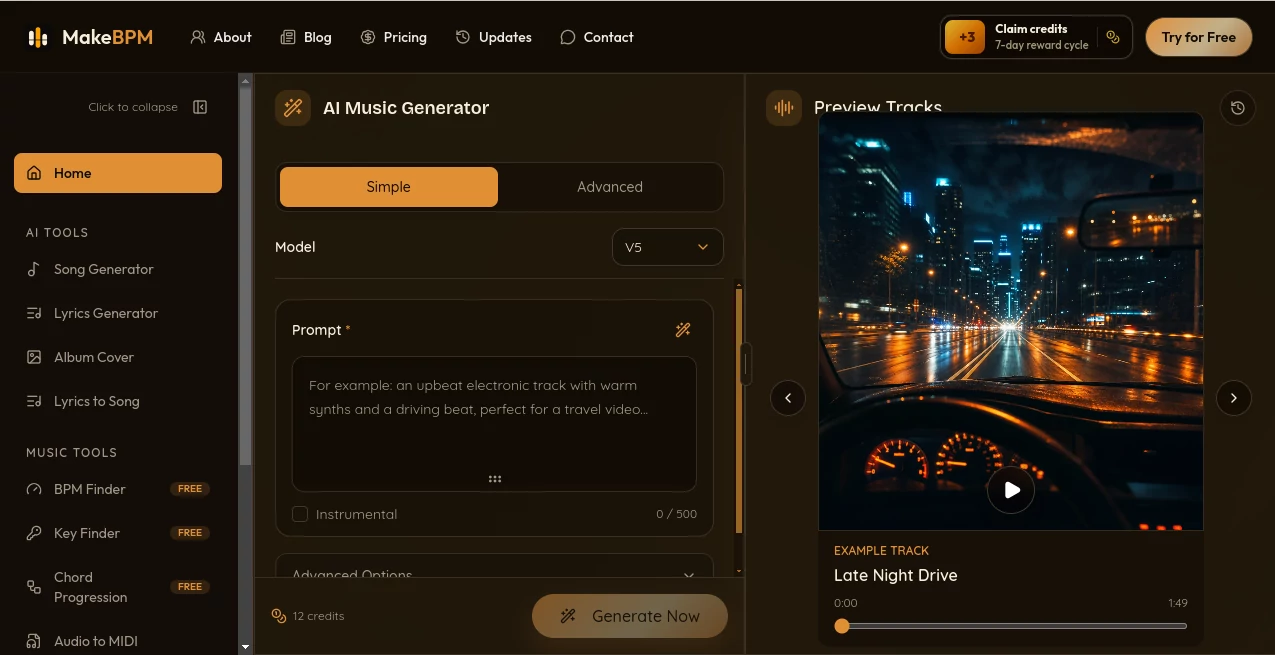
The experience is intentionally straightforward. You can describe what you want in plain language, provide lyrics, or upload reference audio, then let the system generate music that you can listen to, compare, download, and continue refining. A standard generation uses 12 credits and provides two track options, which is a practical touch when you are exploring several creative directions.
Key Features
- AI music generation from text prompts, ideas, moods, genres, and scenes
- Lyrics-to-song generation with vocals, melody, and instrumentation
- Creation of songs, beats, background music, and soundtracks
- Reference audio support for guiding the sound, style, or energy of a creation
- BPM Finder and Key Finder for music-production workflows
- Chord Progression Generator and Audio to MIDI tools
- Vocal removal for karaoke, covers, remixes, and editing
- Music extension and stem-separation workflows planned as part of the studio
- MP3 downloads, with WAV export planned for higher-tier users
User Interface
The interface focuses on the creative task rather than technical music-production terminology. A new user can start by describing a musical idea, pasting lyrics, or supplying reference audio. From there, the workflow moves naturally toward generation and previewing.
This makes the platform particularly approachable for people who may have a strong creative idea but little formal knowledge of music theory. A video creator, for example, can start with something as simple as a description of the mood and pacing needed for a scene instead of manually building a track from scratch.
Accuracy & Performance
Music generation is naturally subjective, so quality is better judged by how closely a result matches the intended mood, structure, and creative direction than by a single technical score. The platform is designed to provide multiple options from a generation, allowing creators to compare results rather than committing to the first output.
Generation generally takes a few minutes, although processing time can vary depending on the request, model, and queue. The ability to create another version and continue working with a track makes experimentation less frustrating when the first result is close but not quite right.
Capabilities
The strongest part of the platform is the range of creative starting points. A songwriter can paste lyrics and turn them into a complete song, while a content creator can describe a scene and generate background music around it. Reference audio can also be used to guide the direction of a new creation.
The wider toolkit goes beyond generation. BPM and key analysis can help with editing and mixing, while tools such as vocal removal, Audio to MIDI, chord progression generation, and planned stem separation support more hands-on workflows. The roadmap also includes features such as song extension, section replacement, remixing, style transfer, and AI cover songs.
Security & Privacy
Users should treat uploaded audio, lyrics, and reference material carefully. The service states that users are responsible for having the necessary rights or permissions for materials they upload or use. This is especially important for commercial projects, client work, and reference tracks.
Commercial usage also depends on the selected plan and the applicable terms. Creators preparing music for publication, advertising, games, or paid client work should review the current usage terms before releasing an important project.
Use Cases
There are plenty of practical situations where an AI music workflow can save time. Video creators can produce background tracks, intros, and scene-specific soundtracks for social content. Podcasters can create opening themes or music that matches the tone of an episode.
Game developers can experiment with themes, loops, and atmospheric cues without first commissioning a complete soundtrack. Marketing teams can also develop music for advertisements, product videos, and branded campaigns. For personal projects, it can turn a birthday, wedding, family memory, or other occasion into a custom musical piece.
Songwriters may find the lyrics-to-song workflow especially useful. Instead of imagining how a chorus might sound, they can hear a generated interpretation and use that result as a starting point for further creative work.
Pros and Cons
- Pros: Simple creative workflow, multiple music-generation options, lyrics-to-song support, reference audio input, useful music-analysis tools, free credits to get started, and plans that include commercial usage.
- Pros: The broader studio approach means users can potentially handle generation, analysis, audio processing, and future editing tasks in one place.
- Cons: Some advanced capabilities are still marked as upcoming rather than currently available.
- Cons: The quality and suitability of generated music can vary depending on the prompt and creative requirements.
- Cons: Commercial rights depend on the plan and applicable terms, so professional users should check licensing conditions before publishing.
Pricing Plans
A free starting option provides 12 credits without requiring a credit card, enough for one standard generation with two track options. Paid subscriptions are available for users who need greater generation capacity.
- Starter: $14.99 per month, with 600 credits, approximately 50 generations and 100 tracks per month, plus text-to-music, lyrics-to-song, BPM tools, basic audio tools, and MP3 downloads.
- Pro: $24.99 per month, with 1,500 credits, approximately 125 generations and 250 tracks, commercial use, vocal removal, and access to additional studio features as they become available.
- Max: $59.99 per month, with 5,000 credits, approximately 416 generations and 832 tracks, priority generation, and advanced workflows planned for the studio.
Yearly plans are also offered at reduced rates, while one-time credit packs are available for users who want additional generation capacity without changing their subscription. Pricing and feature availability can change, so checking the current plan details is sensible before purchasing.
How to Use MakeBPM
- Start with a musical idea, lyric, mood, genre, scene, or reference track.
- Describe the sound you want in plain language or provide your lyrics.
- Generate the music and wait for the available track options.
- Listen to the results and compare the versions.
- Select the direction that fits your project best.
- Use available audio tools to analyze or process the track when needed.
- Download the finished result in the available format and use it according to your plan and applicable rights.
Comparison with Similar Tools
Many AI music services concentrate primarily on generating a song from a prompt. This platform takes a somewhat broader approach by combining generation with music-production utilities such as BPM detection, key detection, chord progression creation, Audio to MIDI, and vocal removal.
That difference can matter for creators who expect to do more than generate a single track. Someone making a short video might begin with an AI-generated soundtrack, check its tempo, remove vocals if necessary, and continue preparing the audio for editing. Advanced workflows such as stem splitting, section replacement, remixing, and style transfer are also planned, pointing toward a more complete creative workspace rather than a one-click generator.
Conclusion
For creators who want to move from a musical idea to an actual track quickly, this AI music studio offers a practical and approachable workflow. Its support for prompts, lyrics, and reference audio gives users several ways to begin, while the collection of music tools makes it useful beyond the initial generation.
The free credits make it easy to test the workflow before paying, and the paid plans provide substantially more capacity for regular creators and commercial projects. The main limitation is that some of the more ambitious studio features are still in development. Even so, the combination of AI song creation and practical audio utilities makes this a compelling option for creators who want to experiment, produce faster, and keep working on their music after the first generation.
Frequently Asked Questions (FAQ)
Can I create music from a simple idea?
Yes. You can describe a mood, genre, scene, or creative direction in plain language and use that as the starting point for music generation.
Can I turn my lyrics into a complete song?
Yes. The lyrics-to-song workflow can turn written lyrics into a song with vocals, melody, and instrumentation.
Do I need music-production experience?
No formal music knowledge is required for the basic generation workflow. You can start with a simple description of what you want to hear.
Can I use reference audio?
Yes. Reference audio can be uploaded to help guide the sound, style, or energy of a new creation. You should only upload audio that you have the right to use.
Is there a free option?
Yes. New users can start with 12 free credits without a credit card. The credits are enough for one standard generation that returns two track options and are valid for seven days.
Can generated music be used commercially?
Paid plans include usage rights according to the selected plan. Starter includes personal and light commercial use, while Pro and Max are intended for broader commercial projects. Users should review the applicable terms for their specific project.
What file format can I download?
MP3 downloads are currently included. WAV export is listed as an upcoming feature for Pro and Max plans.
Can I continue editing a generated song?
The platform is being developed around an ongoing studio workflow. Features such as song extension, section replacement, stem splitting, remixing, and style transfer are planned, while currently available audio tools can already support additional processing tasks.
How many tracks does one generation produce?
A standard generation uses 12 credits and returns two track options, giving you an opportunity to compare alternatives before choosing a direction.
AI Text to Music , AI Singing Generator , AI Music Generator .
These classifications represent its core capabilities and areas of application. For related tools, explore the linked categories above.
MakeBPM details
Pricing
- Freemium
Apps
- Web App
Categories

MakeBPM Alternatives Product

MakeBestMusic

ModelsLab

SeedMusic 1.0

Custom Song

MusicGPT AI
AI Music Gen…
Musikalis AI…

Soniq Chat
Lyria 3 AI M…