


















Ptero
What is Ptero?
Ptero is a free AI chat platform built for people who want quick access to multiple language models without jumping between different services. There is no signup requirement, no subscription to manage, and no stated usage limit, which makes it particularly appealing for developers, students, and anyone who simply wants to experiment with AI without adding another account to their list.
The idea is refreshingly straightforward: open the platform, choose a model, and start asking questions. For developers, that can mean debugging an error, generating a piece of boilerplate, comparing approaches, or getting a second opinion on a tricky programming problem. For learners and creators, it can be just as useful for explanations, brainstorming, research, and everyday questions.
Key Features
- Access to multiple AI language models from one interface
- No signup required to start chatting
- Free access without a stated usage limit
- Model switching for comparing different responses
- Media Library for managing uploaded images, documents, and other files
- Projects section for organizing conversations into separate workspaces
- Useful support for coding, debugging, learning, brainstorming, and general AI conversations
User Interface
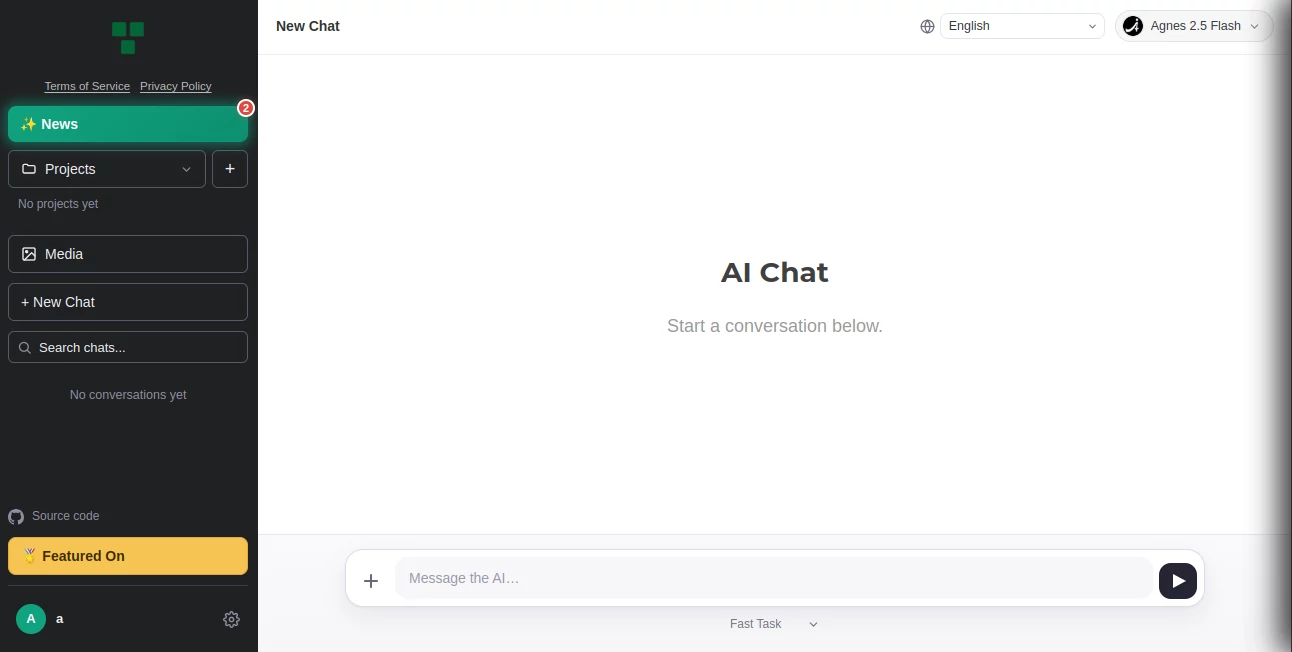
The interface is designed around the chat itself rather than surrounding users with unnecessary menus and account-management steps. That simplicity is one of its strongest advantages. Someone testing an idea for the first time can get started without first creating a profile or choosing a paid plan.
The newer Projects feature adds another useful layer for people with ongoing work. Instead of treating every conversation as an isolated exchange, users can organize chats into separate areas. The Media Library also makes the workspace more practical when a question depends on files, screenshots, or other supporting material.
Accuracy & Performance
Response quality naturally depends on the model selected and the quality of the prompt. The ability to work with multiple models is useful here because users do not have to accept the first answer they receive. A developer can ask the same technical question through different models, compare the reasoning, and decide which response is more useful.
This approach is especially practical when dealing with programming problems. For example, if an error message has several possible causes, comparing responses can reveal different debugging paths that might otherwise be overlooked. As with any AI assistant, generated code and technical recommendations should still be tested before being used in production.
Capabilities
The platform is particularly well suited to AI-assisted development. It can help with debugging, code generation, refactoring ideas, explanations of programming concepts, architecture brainstorming, and exploring different solutions to a technical problem.
Its usefulness is not limited to developers, though. Students can use it to break down difficult concepts, creators can brainstorm ideas, and everyday users can use different models for writing, questions, research, or general problem-solving. Projects and file support make it more suitable for longer-running tasks than a basic one-off chat interface.
Security & Privacy
The lack of a mandatory signup is a notable privacy advantage from a friction perspective because users do not need to create an account simply to start a conversation. However, users should still avoid placing confidential source code, private documents, passwords, API keys, or sensitive personal information into an AI chat unless they have reviewed the service's current privacy and data-handling terms.
This is particularly important when using the Media Library. Uploading a file to an AI service should always be treated differently from keeping that file locally, especially when the material belongs to a client, employer, or organization.
Use Cases
Debugging and troubleshooting: Developers can paste an error message or problematic code and ask for possible causes, explanations, and fixes.
Code generation: It can be useful for producing boilerplate functions, example implementations, small utilities, and starting points for larger projects.
Learning programming: Instead of searching through several documentation pages, learners can ask for a concept to be explained in simpler language and then follow up with more specific questions.
Model comparison: When an answer matters, switching between models provides a practical way to compare suggestions rather than relying on a single response.
Project work: The Projects section can help separate conversations by application, subject, or personal workflow, making the workspace easier to navigate as usage grows.
File-based conversations: The Media Library gives users a way to bring images, documents, and other files into their AI conversations when additional context is needed.
Pros and Cons
- Pros: Free to use, no signup required, multiple AI models, simple chat experience, model comparison, Projects organization, and support for file attachments.
- Pros: Particularly useful for developers who regularly want to test different approaches to the same technical question.
- Pros: Removes much of the account and subscription friction found in many AI platforms.
- Cons: The quality of an answer can vary depending on the selected model and prompt.
- Cons: Users who need enterprise-grade controls, formal team administration, or specialized development integrations may require a more dedicated platform.
- Cons: Free access should not automatically be interpreted as unlimited guarantees for every future feature or model.
Pricing Plans
The service is presented as completely free, with no signup requirement and no stated usage limits. This makes it notably different from many AI chat platforms that place their more capable models, higher usage allowances, or additional workspace features behind monthly subscriptions.
For someone who only wants to experiment with several AI models, test prompts, solve a coding problem, or get a quick second opinion, the absence of a paid entry point is a major attraction. Users should nevertheless check the current service terms for any future changes to availability, limits, or supported models.
How to Use It
Getting started is intentionally simple. Open the service in a web browser and begin a conversation without creating an account. Select an available language model when appropriate, describe the task clearly, and provide enough context for the model to produce a useful answer.
For programming work, a good prompt might include the relevant code, the exact error message, what you expected to happen, and what you have already tried. For model comparison, give the same prompt to different models and examine their answers side by side. If you are working on a larger task, use Projects to keep related conversations together and the Media Library when supporting files are useful.
Comparison with Similar Tools
Compared with traditional single-model AI chat services, the main difference is the emphasis on bringing multiple models into one place. Users who frequently test different AI systems may appreciate not having to maintain several separate tabs or accounts.
It also takes a lighter approach than many developer-focused AI platforms. Instead of requiring a complicated setup, API configuration, or a dedicated coding environment, it puts the conversation at the center. That makes it a convenient companion for quick experiments and everyday development questions.
It will not necessarily replace a full IDE assistant, enterprise AI platform, or specialized coding environment. Its strength is simpler: it gives users a convenient place to ask questions, compare model responses, work with supporting files, and organize ongoing AI conversations.
Conclusion
Ptero takes an appealingly simple approach to AI assistance: give users access to multiple language models without making them create an account or commit to a subscription first. For developers, the combination of coding assistance, model comparison, Projects, and file support makes it more useful than a bare chat box.
The biggest attraction is the lack of friction. When you have a programming error to investigate, an idea to test, or a question that deserves another AI opinion, being able to open a browser and start working immediately is genuinely convenient. It is a particularly interesting option for developers and learners who want to experiment with different models without building their workflow around several separate services.
Frequently Asked Questions (FAQ)
Is it free to use?
Yes. The service is presented as completely free, with no signup requirement and no stated usage limits.
Do I need to create an account?
No. One of its main selling points is that users can start chatting without signing up.
Can developers use it for coding?
Yes. It is designed to be useful for debugging, code generation, refactoring ideas, programming explanations, and exploring different technical approaches.
Can I compare different AI models?
Yes. Multiple language models are available through the same interface, allowing users to switch models and compare their responses.
Can I upload files?
Yes. The Media Library supports managing images, documents, and other files that can be used as context during AI conversations.
Can I organize conversations into projects?
Yes. The Projects section is designed to keep related conversations organized into separate workspaces, which can be useful when working on multiple applications or subjects.
Is it only useful for programmers?
No. Although developers are an important target audience, it can also be useful for students, creators, researchers, and anyone who wants to ask questions, brainstorm ideas, learn concepts, or compare AI-generated answers.
Should I trust AI-generated code without checking it?
No. AI-generated code should always be reviewed, tested, and adapted to the requirements of your project before being used in production.
AI Chatbot , AI Code Assistant , Large Language Models (LLMs) , AI Developer Tools .
These classifications represent its core capabilities and areas of application. For related tools, explore the linked categories above.
Ptero details
Pricing
- Free
Apps
- Web App
Categories

Ptero Alternatives Product

Vibe Code Pi…

eesel AI

JSON-Tools

Sourcetable

Grok

Romantic AI

HostFinder

Timestamp Ro…

Dewy Chat
